Saturday, September 26, 2015

Tech Coaching: Getting Ready to Step into a New Role

All teams have a coach whose job it is to bring success. This is nothing unusual to most of us, but I have most often been one of the players on a sports team, not the coach. For me to become the one who observes and provides feedback or models a strategy is quite a change from just being a trainer or adviser of all things technology. I see it as a major shift in my thinking about how I help teachers integrate technology and am curious about several models presented in our chapters. Since plenty of research has been done on instructional coaching, my focus for this post will be on relating coaching to technology and how we can help teachers make progress toward their goals. So, exactly how does a technology coach get teachers moving towards innovation? Several key factors that stood out for me were:

  • Recognizing the nature of the coach-teacher relationship
  • Selecting a model for coaching based on each situation
  • Establishing a coaching perspective to help direct teacher actions

In preparation for stepping into the role of a technology coach, it is important to have both awareness and knowledge of these factors that will impact how I put coaching into practice. Each phase of the coaching process needs to be strategic and purposeful and may even require on-the-spot decisions and advice. I often deliver training sessions, provide technical assistance, and help teachers investigate their digital options to support what they are already doing in their classrooms. Taking more of a coaching role will require me to think differently as I prepare to work with them and be more proactive by finding out what technologies they currently use and what is available to them at their school.

Teacher-Coach Relationships
Marzano & Simms (2013) point out that the coach is not an evaluator or supervisor of the teacher and that take most of the pressure off of the development of a collegial relationship (p.9). If I were to sense that a teacher was not a willing participant in the improvement process, which does happen at times, then I would adjust my approach and carefully form my questions in attempts to build trust and establish a positive relationship. Working with teacher who are tech savvy and up-to-speed on the latest sites and tools is ideal, but I am always up for the challenge presented by those who claim to be ‘old school’ or tech newbies.

The Coaching Model
Choosing a model almost equates to selecting a play or a strategy in a game. I looked into the GROW model and found this graphic that illustrates the steps necessary to design a plan for improvement. Gallwey definitely started the ball rolling with bringing his tennis coaching principles into the business world, and he influenced Whitmore’s model which emphasizes a teacher’s potential and meeting their own goals (Marzano & Simms, 2013, p. 14). This will be my preferred model in coaching situations because it is driven by logical questioning techniques and is appropriate for even experienced teachers. The great thing about technology is it is always evolving and can bring new life to any classroom with the right implementation. Digital tools can provide a way to differentiate instruction, reteach missed skills, and enhance a traditional lesson so that all students are engaged and excited about learning.

A New Perspective
Probably the biggest adjustment any of us will make is to see ourselves as coach rather than trainer, mentor, or teacher. I guide teachers step-by-step in technology training sessions weekly, but being a coach means I will be listening way more often than I will be doing the talking. I believe my knowledge of how various digital tools and resources can enhance a lesson or allow efficiency in collecting data will benefit me in my new role as coach. I anticipate that many teachers will have content-specific goals they want to achieve, and they will want me to recommend the best, most engaging and effective resources to meet their needs.
Schools That Work, Hampton High School in VA video about their experience with instructional technology coaching: https://www.youtube.com/watch?t=2&v=4l5JBUacW1w

Coaches see the potential in their players and the goal is to win the game. The learning environment is like our playing field, so moving forward means  we prepare our mindset, analyze the situation, and gather the tools we need to help teachers reach their potential.

References

Marzano, R. J. & Simms, J. A. (2013). Coaching classroom instruction. Bloomington IN: Marzano Research.


Thursday, July 30, 2015

A Reflection on My Instructional Design Process

All teachers want every lesson they deliver to be a positive learning experience for students. I now have a much better understanding of every piece of the process to ensure this happens for me and all teachers I train. A sufficient amount of time and planning plus the mindful selection of media and tasks will result in a well-designed lesson (Larson and Lockee, 2014, Loc. 4549). I think if any one of the ADDIE components are left out of this design process, then learner needs won’t be met and the lesson will fall into the ‘poor and ineffective’ category. Will some lessons fail? Of course they will! The key is to bring that lesson out of failing mode and give it a redesign to improve and change the parts that did not work. Instructional design is a process that mostly happens before the lesson is taught and includes phases: learner analysis, planning and design, developing the activities, and implementing the lesson. Evaluation happens at the end of the lesson, but it also occurs during the process so that at any time a component can be modified or eliminated.

Prior to this course, I was not aware of the Connectivist Approach to instruction and how it can enable educators to build a high-quality, robust lesson from any content area and for any grade level.  In my approach to developing a training session, I realize how each decision made throughout the ID process should be centered around the participants, their perception of the topic, and how they will use their new ideas and skills to impact student learning (Larson and Lockee, 2014).

My professional development session, Bring It On with BYOD, addresses policies, management, and instructional use of BYOD. The goal is to guide teachers in their planning as they strive for a 1:1 learning environment (Davis, 2014). My target audience is high school teachers of all subjects, but this training could be delivered for middle and upper elementary teachers as well. Even after I went through the selection of media and activities, I made some last minute changes to my agenda because I do not want to confuse or overwhelm my participants. Since the topic is BYOD, I chose to model a lesson using NearPod, a free app for students for any device/OS. I designed my slides in PowerPoint and imported them to NearPod where I added even more activities and resources. I selected a few different interactive tasks and two different assessment tools to demonstrate, Socrative and a Google Form which will be accessed by QR code. One digital strategy in my training is called an ‘App Smash,’ and it will be a new term for most of my participants. I selected an article on how to teach students to App Smash and will give teachers time to read or scan it during the session. My presentation, video, handout, and more resources are on my blog page, Bring It On with BYOD in Your Classroom.
Image Credit: https://ipad4schools.files.wordpress.com/2014/04/i4s-appsmashing-005.png 

One thing I will change for future trainings is to include at least one task or activity that allows the participants to have several options for a more differentiated style. Also, I have usually posted my handouts and presentation on my blog for participants to access after the training is over, but I have several new ideas on how I will make these available in the upcoming year. For example, one idea I want to try is to create an app that will act like a web page for all materials, activities, and assessments to make PD available anywhere, anytime.  If time allows me to create a prototype this fall, then I may have a sample group of teacher try it out for our next class. Overall, I have many new ADDIE-inspired ideas that I plan to develop in the upcoming school year.

References

Davis, V. (2014, Feb 4). 6 BYOD discussions every school should have. Retrieved from Edutopia: http://www.edutopia.org/blog/byod-discussions-schools-should-have-vicki-davis


Image retrieved from: https://ipad4schools.files.wordpress.com/2014/04/i4s-appsmashing-005.png 

Larson, M. and Lockee, B.B. (2014). Streamlined ID: A practical guide to instructional design. New York: Routledge.

Thursday, July 23, 2015

Technology Selection for 21st Century PD

Choosing the right technology for learning involves selecting the tools you will use as the presenter, resources and devices your participants will use to be trained, and the digital means you may use to actually deliver or record your training. For this blog post, I will mainly focus on the last 2, but the presentation and modeling of effective technology use is also a crucial part of any professional development.


Take BYOD for example. As more and more schools embrace the idea of students bringing their personally-owned devices to school, teachers are realizing that there are new opportunities to make use of these devices in their classroom for learning. In my opinion, there are many digital activities that students can participate in without the need to be one-to-one in the classroom. However, there can be huge benefits for students to have their own computer or tablet to work on for assignments or even for a collaborative project. If a teacher does not have a classroom set of computers or mobile devices, then they might consider encouraging students to bring in their own device assuming the school and district have a policy that allows BYOD. This is something we are promoting in my district and in the upcoming school year, we will be training teachers in many of our schools on a variety of instructional activities, apps, and strategies they can use to improve learning and achievement. Larson and Lockee (2014) describe how teachers should familiarize themselves with the different types of technology and their capabilities in order to make the most effective choices for instruction and best support the learners in your classroom (Kindle location 4533, 4550).


Several important factors influence my decisions on the technology to include when I train teachers and provide professional development at schools:
  • The topic or content of the training
  • The desired learning outcomes and chosen strategies
  • The existing technology available at that school or site
  • Specific requests for a particular resource or device training by the principal or group of teachers

One assumption I often make is that elementary level teachers expect training to include digital tools that are appropriate for younger students. When I work with secondary teachers, there are often teachers from different grade levels and subject areas. In that case, I always try to include a balance of tools from various subject areas that are appropriate for their age group.


Over the last 5 years I have worked to develop my own Professional Learning Network (PLN) using a combination of tools including Diigo, Pinterest, Twitter, and some of my favorite online technology journals and edtech bloggers. I am always looking for new resources and tools to try out and share with other teachers both formally in training and informally through emails and in conversation. Teachers may want something new to try, but it can be a mistake to overwhelm them with too many ideas and options. In Chapter 9, Larson and Lockee (2014) share that there appears to be no standard categorization of instructional technology, but I have seen several infographics and charts recently that appear to be attempting to create this type of structure (Loc 4500). I think this is helpful for teachers because it allows them to choose a level of Bloom’s taxonomy or a certain medium they want their students to use and matches it to a digital tool, site, or resource. A visual chart like iPadagogy is useful for professional development too because it connects strategies and outcome with the tool or app.


As I work with teachers to train them on utilizing student’s personal devices for learning in their classroom, selecting the technologies to deliver the content are key to the effectiveness of the training. The convenience of anytime, anywhere learning is not just for students; it is for all of us.

References 

Image retrieved from: http://elearningstuff.net/wp-content/uploads/2013/06/padagogy-wheel.jpg

Larson, M. and Lockee, B.B. (2014). Streamlined ID: A practical guide to instructional design. New York: Routledge.

Wednesday, July 15, 2015

Design a Framework that Keeps the Learner at the Center


Designing any learning experience involves making several crucial decisions and then carefully developing those ideas into the components of the session or lesson. Once I know a little more about my learners or participants, I can build appropriate tasks into the lesson and provide the necessary information about a new topic. In Chapter 4, Larson and Lockee (2014) describe the different approaches to instructional design, and I am intrigued by the connectivist learning approach that builds in application to real-world problems and resources to support learners (Loc. 2236).  No matter which approach is chosen, the learners should remain at the center of the decisions and planning.


According to Larson and Lockee (2014) the approach chosen may ”call for different planning processes to select strategies and ways to address content and learning experiences (Loc. 4046-4050).” In a classroom setting, using a student-centered approach means selecting tasks, activities, and assessments that are more focused on the specific student needs, abilities, and learning styles. I think a learner-centered approach to professional development requires similar processes and task-selection but you may not know your learners as well as you would students you teach every day.

I am working to prepare a short training this week, a small part of our Google Camp, and it is an opportunity to apply what I have learned from our text.  In particular, I have to identify the most effective strategies to use and determine which technologies we will use to complete one or two tasks during the session. Once I was given my topic, I immediately considered these 3 main questions to start devising a framework:
    This pyramid shows the effectiveness of certain teaching methods and student retention. Lecture at the lowest, 5 percent retention and teaching others as the highest with 90%. No more lecturing students, they are only holding onto 5% of the lessons you teach! Include more student led instruction where students learn on their own and allow students to teach other students.
  • What is most important for them to know or understand? 
  • What will they do on their own or with a partner/group during the training?
  • What will they make or be able to use after the training?
One thing I realized is that the process of developing the session needs to start with the learners in mind rather than on what I will do and say as a part of the training. I will not know ahead of time who is attending my session, but I will plan to ask them informal questions throughout the session to gather information. My current plan is to include a mixture of direct instruction, group discussion, digital resources for additional learning, and at least one interactive game like Kahoot or Socrative. Ultimately, I want any parts of the session that I present to be a model for my participants so they can apply the content to their subject area and grade level.

In a training I attended recently, the facilitator used a combination of strategies that I found very effective. She gave us a handout that I could draw my own illustrations on, but her examples were scenarios that helped me understand each part of the larger idea. The active learning activities I participated in during this hour-long session were engaging and interesting. Teachers attending a professional development or training session tend to expect this type of learner-centered approach and to have opportunities to apply their learning to real-life situations they may experience in the classroom.

References


Image retrieved from: http://teacher-woman.tumblr.com/post/16935049233/average-learning-retention-rates-this-is-why-i

Larson, M. and Lockee, B.B. (2014). Streamlined ID: A practical guide to instructional design. New York: Routledge.

Wednesday, July 8, 2015

Gauge Learner Needs to Design a Successful Learning Experience

Figuring out where to start with a lesson when you do not know who your learners are can be a huge challenge. In the 1st chapter, Larson and Lockee (2014) advise teachers to start by thinking about the end results to effectively design a lesson. If a teacher knows what the desired end result is then that gives direction and perspective to planning the learning experience. Regardless of the content of a professional development effort, a major focus should be to empower teachers to best serve their students and take steps toward achieving their goals as a master educator. A key component to achieving this goal is to get to know your learners and get them invested in the learning process. The design of the lesson simply must capture the attention and interest of the learner.

A Comparison to Illustrate Good and Bad Instruction

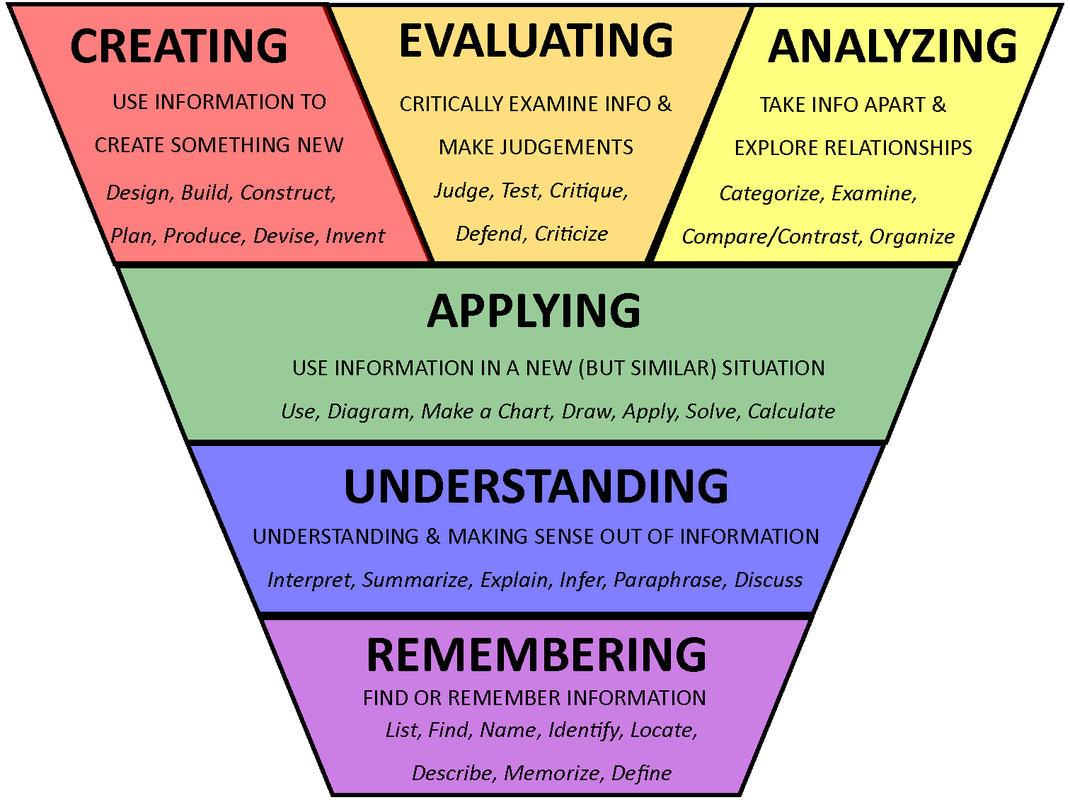
When I think about the learning experiences that were most successful for me, it was often the teacher sharing a story related to the content that made me interested in learning and exploring that topic further. My World Geography professor in college knew how to grab our attention each morning at 8 a.m. by giving a personal account of time he spent in a country or telling about a unique cultural tradition a certain people have in a remote area of the world. It was exciting to await his entry into the room and wonder which point on the map he would select that day and which fascinating details he would reveal. I may not remember every detail, but I learned how to learn on my own and sift through topics while deciding what I want to delve into deeper. In complete contrast, I dreaded my 7th grade geography class that utilized textbooks, teacher-dictated notes, and filling in maps as the daily instructional activities. It was 99% on the ‘remembering ‘ level of Bloom’s, and I was rarely engaged in the content or interested in anything related to countries and cultures of the world. We did not have the Internet when I was in high school, so the wealth of information and resources was quite different. When I consider today’s learner and the resources they have at their fingertips, the importance and urgency of building certain skills and abilities early on becomes clear. Teachers also have an incredible amount of resources available 24/7 like YouTube, Pinterest, and others that let us learn on our own. They need to become curators and investigators of the content online that best fits with their instructional needs, but they need guidance and advice to stay current and be efficient in their efforts. 

Teachers Need High-Quality Learning Experiences Too

Providing appropriate, high-quality professional development is not an easy task. In chapter 2, Larson and Lockee (2014) point out the need to spend time gathering and analyzing data about participant abilities and experiences in the early stages of planning. One way to do this is to give a sample group of participants a short survey asking targeted questions about things like learning preferences, experience, and even wants and needs. In my experience, teachers appreciate having input prior to the training and giving feedback after it is complete. In teacher trainings, the content is usually related to the instructional needs of the students served by that school and the quality teaching standards set by the state and district. Similar to classroom instruction geared towards students, goals for teacher professional development may have already been established. Even if the overarching goal is set in stone, as the designer of the class, I usually take part in determining the details of each activity, task, and project that will be included. Every part of the training should engage most of the participants. Consider this situation: If there is minimal evidence teachers are making use of a particular digital resource, for example Google Apps, then I may assume it is because they need more training. It is possible that other factors are keeping teachers from making use of Google, such as regular access to digital devices or the computer lab, inconsistent or poor wireless network, or a negative attitude towards using technology with students in general. Surveying the learners ahead of time will reveal most of these unknowns and allow me to use creative design techniques to build a session that will be engaging, inspiring, and challenging for them and make the learning experience successful.


References

Image retrieved from: http://blog.curriculet.com/wp-content/uploads/Blooms-Taxonomy.png 

Image retrieved from: http://www.vickihalsey.com/resources/aids-a-templates/67-engage-model 

Larson, M. and Lockee, B. (2014). Streamlined ID: A practical guide to instructional design [Kindle reader edition]. New York: Routledge.

Tuesday, April 21, 2015

Is a Centralized Approach Best when Purchasing Technology for Learning?

Purchasing technology for schools used to mean buying a Windows-based PC to place in a classroom or computer lab (Picciano, 2011, p. 229). With the emergence of lower-priced laptops, mobile tablets, and multi-platform apps, technology for learning has gotten more exciting and more complex. One huge challenge that schools face is how to stretch their technology dollars to both get the best return on their investment and to make the biggest impact on student achievement. It can seem like an almost impossible task with the swiftly-changing selection of devices and the speed at which they become obsolete.

From a district standpoint, it may seem easier to keep a more centralized approach to purchasing in terms of equity, training, location, and maintenance. Picciano (2011) discusses several valid reasons a system needs certain resources to be managed and coordinated (p. 230). When certain parts of a district’s infrastructure and administrative applications are not facilitated centrally, it can lead to reduced productivity and higher costs in the long term. A district making a high volume purchase from an established vendor or company has more confidence in knowing they have made a sound investment and will receive the support and training needed to ensure it was worth the cost (Gupta, 2014).  
Videos aid in researching technology products before investing in them.

Classroom technology purchased for teacher instruction and student learning usually fall into a more complex category that is almost impossible to define. With most other technology purchases, cost-effectiveness and productivity are the top goals, but in the classroom, there is a shift in purpose to what will benefit students most and what will be easier for teachers to use and manage. So schools often enter into some sort of pilot or trial when they plan to invest a substantial amount of money which can take months or a whole year to complete (Gupta, 2014). Each grade level and subject area has its own set of goals and objectives, but that does not necessarily mean teachers will make the best decisions about which devices and apps will meet their students’ learning needs.


Poor spending choices can result from wanting the latest and greatest new devices and not having a pedagogically-sound plan for how the technology will be used (Eisele-Dyrli, 2011). Teachers must exercise caution when they secure funds for technology spending by doing some research, having a specific set of goals and activities for devices and apps, and consulting with district personnel who can validate or approve the purchase. Taking these extra steps will help ensure responsible spending and successful results.


References
Eisele-Dyrli, K. (2011 July). Finding the Right Purchasing Solution. District Administration. Retrieved from: http://www.districtadministration.com/article/finding-right-purchasing-solution.
Gupta, U. (2014, Sep 28). Education technology: Could it be different this time? Edsurge. Retrieved from:  https://www.edsurge.com/n/2014-09-28-education-technology-could-it-be-different-this-time
Image retrieved from: http://cdn2.hubspot.net/hub/80068/file-15717879-jpg/images/enterprise-mobile-devices-20113.jpg?t=1429289423417  
Picciano, A. (2011). Educational leadership and planning for technology. Upper Saddle River, NJ: Pearson.
Video retrieved from: https://youtu.be/IcSD8WjpOog

Friday, March 27, 2015

Today’s Technology Presents Challenges and Opportunities

Dependable access to technology gives teacher the ability to be more productive than ever before, and we have never had so many programs to choose from as are available today: online programs, mobile apps, and activity packs or in-app additions. Until recent years, students would only have access to software and hardware reviewed and purchased by the school or district (Picciano, 2011, p. 189). Teachers and administrators are responsible for ensuring that students are protected and being exposed to high-quality instruction even when they are learning online or using technology. One challenge is to determine how we evaluate free versions of apps and software most effectively to ensure the safety of our students, their content, and their privacy. Not too long ago, a software program sold to a school would have minimal technical support provided and few or no updates over time and usage. Schools may have technology teams in place who are responsible for evaluating and selecting software, but when it comes to classroom devices, this decision can be up to the teacher (p. 190). Before a teacher uses an app or web-based tool with students, it is best to determine if the students are going to have to create an account to register on the site. At the very least teachers need to read the terms of use and privacy policy of the digital tool they plan on having their students use. Because of federal laws many sites require the student to be at least 13 years of age, or they are not allowed to use the site at all. Some websites allow students to create an account with parent permission, but either way the teacher must become familiar with the terms of service.
Image retrieved from http://www.cpschools.com/BYOD/images/byod.jpg  
Since wireless networks are the norm and BYOD is allowed in many schools, the software program options have changed for students.  A student who brings their own device to school can install free and 'freemium' apps to use for reading, research, writing, and other learning activities. To keep up with quickly-changing technology, many schools have adopted a BYOD policy allowing students to bring a personally-owned device. Some districts who previously adopted a one-to-one initiative have found they are difficult to sustain over time. One alternative is to allow students to bring their device and use it for instructional activities and learning. Parents, students, and teachers should all be a part of planning for BYOD and be able to give their input about guidelines and expectations (Davis, 2014). This video gives some insight into why students benefit from BYOD at school.

School leaders must prepare their infrastructure and wireless network to create a way for individually-owned devices to work properly and efficiently. Some schools establish a guest network to allow any device to get on the wireless. Preparing teachers to use BYOD for instruction, assessment, and classroom learning activities is becoming more commonplace (Davis, 2014). The possibilities that come with establishing BYOD in schools can help 21st century schools reach their vision and increase student achievement with proper planning, app and software reviews, professional development, and parent communication.

References


Davis, V. (2014, Feb 4). 6 BYOD discussions every school should have. Retrieved from Edutopia: http://www.edutopia.org/blog/byod-discussions-schools-should-have-vicki-davis

Picciano, A. (2011). Educational leadership and planning for technology. Upper Saddle River, NJ: Pearson.